
TL;DR: Creative operations is the connective system that moves creative work from intake through production, review, and delivery, so a growing team ships faster without manual glue holding it together. In 2026, the teams that ship fastest run creative ops on a central library where organization, workflow, review, and feedback all live in one place. This guide defines creative operations, shows where it breaks as you grow, and gives you a maturity model for building a system that keeps pace with the work. Schedule a demo to see it in motion.
Here is the belief underneath all of it. Your team's creative work is a living, breathing beast. Your system should reflect that. Most creative ops setups do the opposite: they freeze a fast-moving process into folders, spreadsheets, and a review tool that forgets everything the moment a file is approved. The work keeps moving. The system stands still. The gap between the two is where your team loses its hours.
What is creative operations, exactly?
Creative operations is the discipline of connecting every stage a creative asset passes through, intake, production, review, and delivery, into one system so work moves without manual handoffs. Think of it as the plumbing behind a creative team: the briefs, files, feedback, approvals, and final deliverables that would otherwise live in a dozen tools and someone's memory. When creative ops is working, an asset flows from request to published without anyone stopping to ask where the latest version is.
The reason it matters now is scale. A solo designer does not need creative operations. A team of twenty producing across a dozen brands and channels does, because the coordination cost grows faster than the headcount. Playbook supports 5,000+ teams with 10 or more members, and the pattern is consistent: the moment a second person touches the work, the connective tissue becomes the bottleneck.
Creative ops is not a single tool and not a job title alone. It is the system, the process, and increasingly the AI that runs both. The rest of this guide is about building that system so it moves at the speed of the work rather than slowing it down.
Why does creative ops break when you scale a creative team?
Creative operations breaks because the glue holding it together is manual, and manual glue does not scale. Every time you scale a creative team, you add more files, more reviewers, more channels, and more places for the current version to hide. The work multiplies, and so does the overhead of finding, routing, and tracking it.
Here is what the breakage looks like in practice:
- The library fragments. Assets scatter across Drive, Dropbox, desktops, and email. Playbook's own reporting shows 96% of users spend less time hunting for files after switching to a central library, which tells you how much time was going to the hunt before.
- Review turns into a scavenger hunt. Feedback lands in Slack, in email, in comments on three different versions. Nobody knows which note is current or whether it was addressed.
- Nothing survives approval. A review tool tells you an asset was approved, then loses the context. The next person to touch that file starts from zero.
The teams that feel this most acutely are the ones producing at volume. WBD Sports, the marketing engine behind TNT Sports, Eurosport, and Bleacher Report, manages 10,000+ assets across markets and federations. Before a central system, coordinating that across legal, brand, and campaign teams meant review cycles stacking up and asset requests piling into inboxes. The fix was not more people. It was better operations.
Schedule a demo if you recognize your team in that list.
How does a central library become the backbone of creative operations?
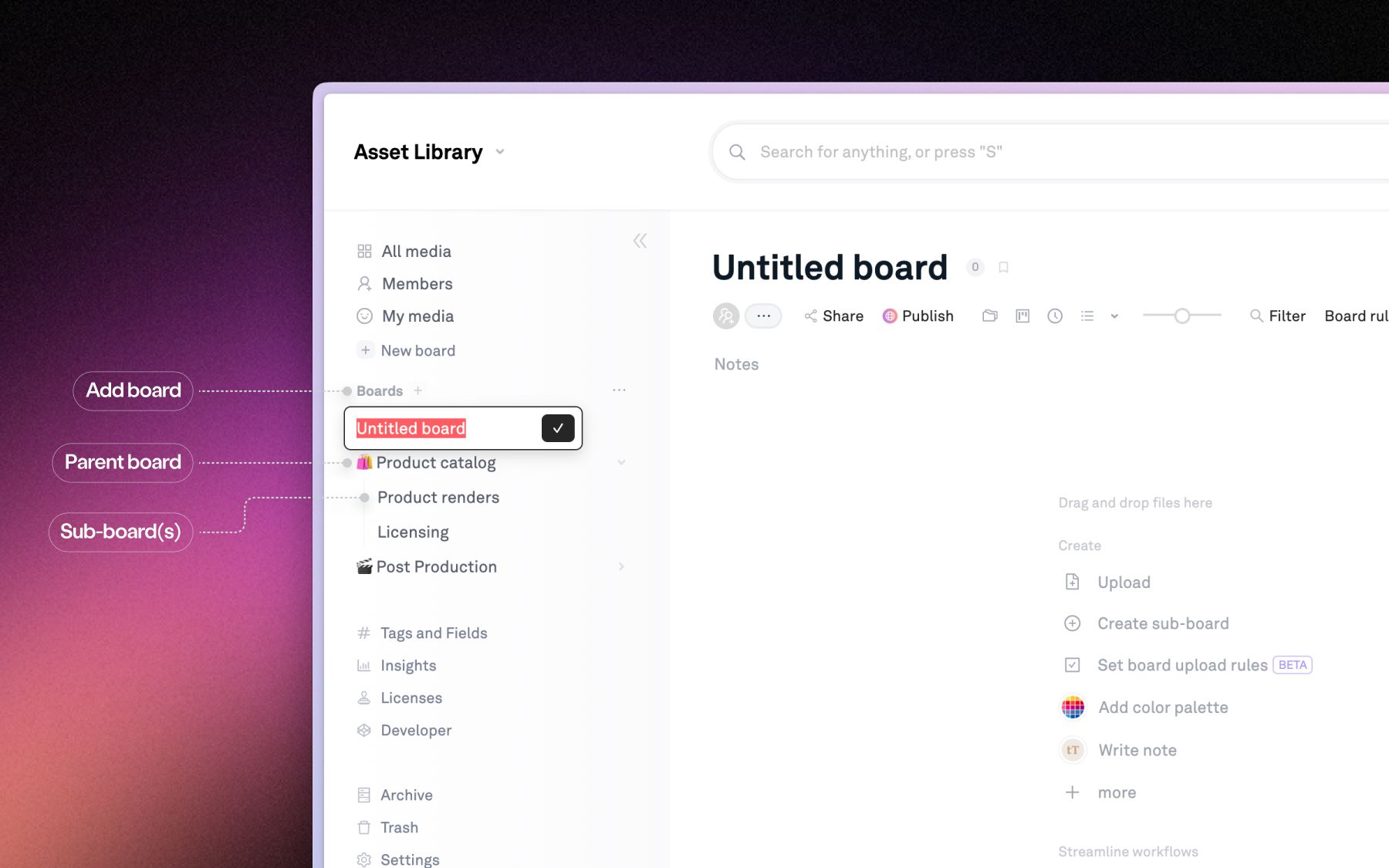
A central library is the backbone of creative operations because it gives every other stage, workflow, review, and delivery, a single source of truth to build on. When the assets live in one place and the system understands what each one is, the manual glue disappears. You stop filing, routing, and re-explaining, because the library does it for you.
This is where AI changes the math. In Playbook, the moment an asset lands, AI tags every image and video across 16 or more dimensions: visual style, color palette, campaign, product, talent, and usage rights. Your brand library knows exactly what is in it, without a human touching a tag. Three capabilities turn that understanding into operations:
- AI Organize. Never file manually again. Playbook understands every image and video by subject, mood, and brand elements, auto-tags them, and suggests how to sort them into boards.
- Board rules. Set a rule on a board once, and every file dropped into it is labeled and placed automatically, so the structure holds itself together as the team uploads.
- Sidebar search that acts. Find what you need in the sidebar, then act on it instantly. Ask for "all sunset beach shots and prep a share link for the client," and Playbook finds them by analyzing the actual visual content, then moves, copies, tags, or shares straight from the results.
The Vault Stock, a creative stock platform in Queensland, runs a library of 50,000+ assets and adds 100 or more every week. At that velocity, filing by hand is not an option. AI tagging and visual search are what let a small team keep a catalog that size discoverable. This is the whole idea behind Playbook Intelligence: talk directly to your creative files instead of managing them by hand.
What does creative workflow management look like day to day?
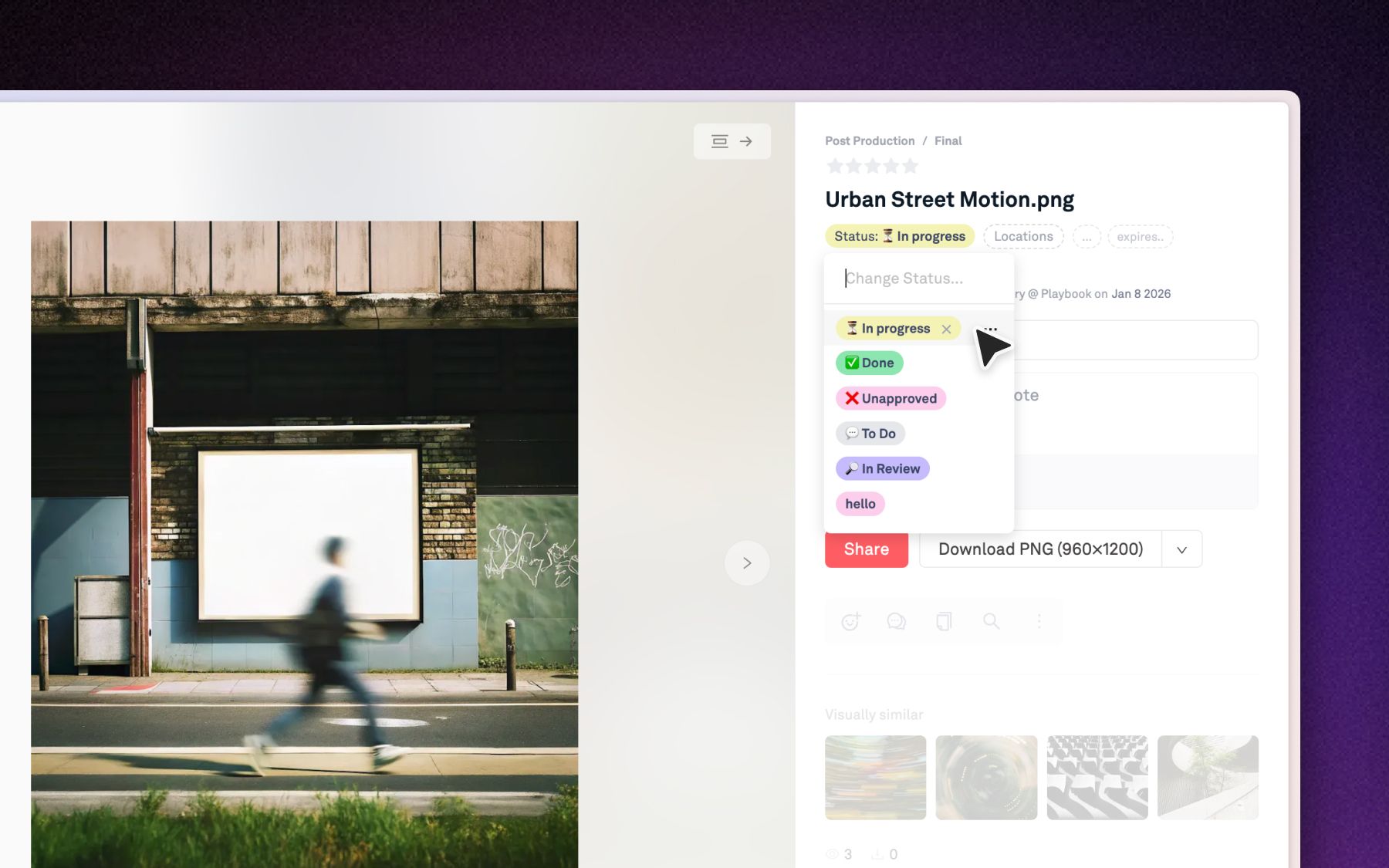
Creative workflow management is the practice of tracking where every asset sits in the process and moving it forward without leaving the library. A grid of thumbnails shows you what you have. It does not show you what is in draft, what is in review, and what is ready to ship. Day to day, creative ops needs the second view more than the first.
In Playbook, a board can be viewed as a Kanban of custom status columns. Each column maps to a status value, so dragging a card from "In review" to "Approved" is the same as changing that asset's status, and the move is saved and broadcast to everyone live. Two facts make this matter for creative production workflow:
- Status lives on the asset, not in a separate tool. You are not syncing a project tracker against a file store. The pipeline and the files are the same object, so nothing drifts out of date.
- Views flex to the work. Gallery for browsing, List for detail, Kanban to track a project through its stages. The same assets, seen the way each moment needs.
WBD Sports uses this structure to run per-market boards with role-based permissions, so a campaign in the UK moves through its own pipeline without colliding with one in the rest of Europe. The result of putting workflow where the work already lives: review rounds dropped from four to two. As David Bret, VP of Marketing for WBD Sports EMEA, put it, "All the objectives I had... they're 100% met."
How do review and approvals fit into a creative production workflow?
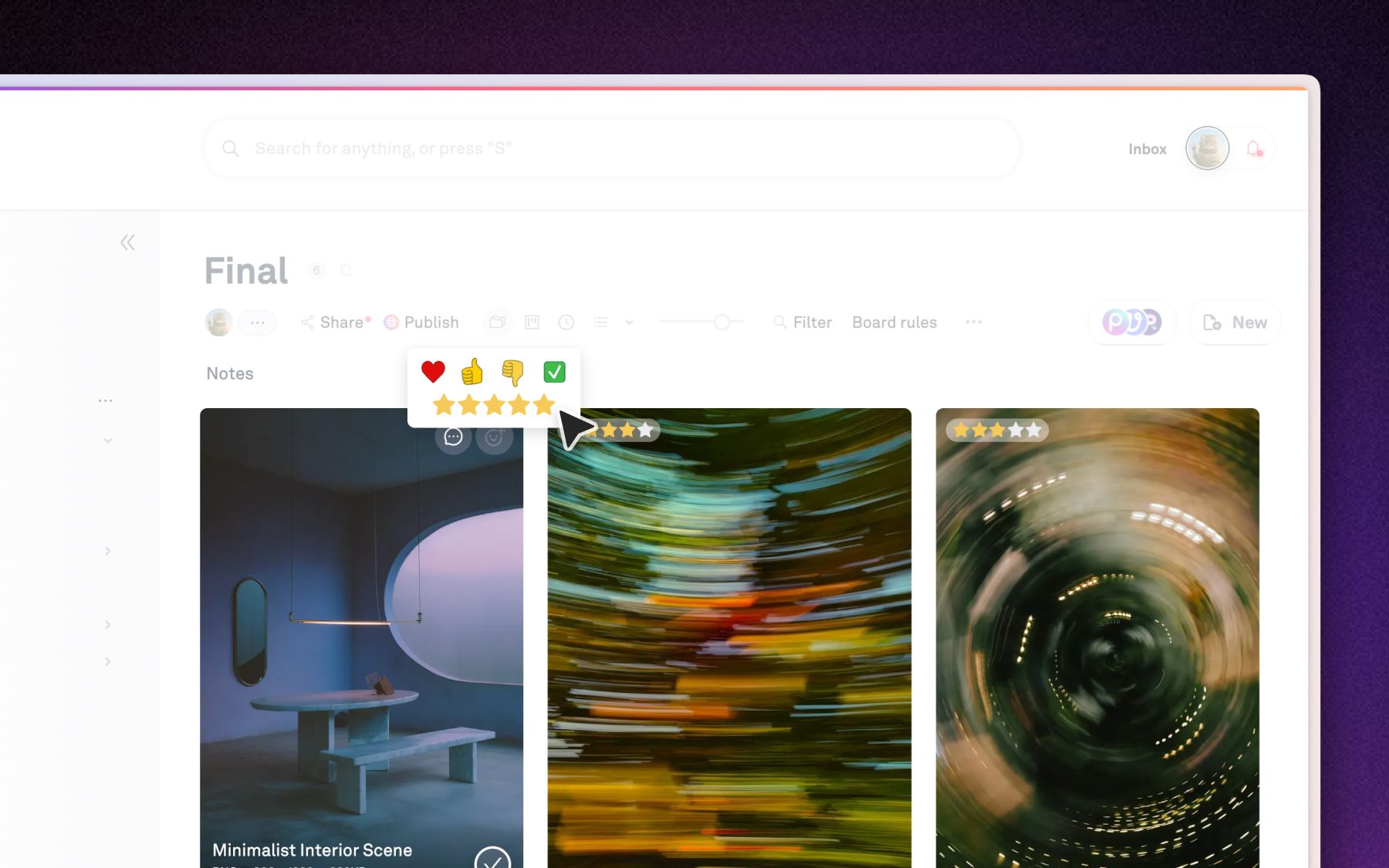
Review and approvals fit into a creative production workflow by living on the asset record itself, so a sign-off is a permanent fact about the file rather than a message that scrolls away. This is the difference between a review tool and a creative operations system. A review moment ends. The library is forever, and approval belongs in it.
In Playbook's review workspace, feedback and approval sit together on the file:
- Comments pin to the work. Reviewers attach notes to an exact region of an image or an exact frame of a video, so "fix this" always points at something specific. WBD Sports used timestamped video comments to streamline legal review, which is what took those cycles from four rounds to two and cut asset requests by at least 50%.
- Approval gates what clients see. Marking an asset approved controls whether it surfaces on a shared link or published board, so one board can hold rough cuts internally while the client sees only the finished subset.
- Activity is a live feed, not an afterthought. The Conversation tab on each board is a real-time stream of what is happening right now: uploads, moves, comments, approvals, board-rule changes, and shares, so anyone opening the board can see what changed and reply in place. This is the everyday collaboration feed. It is different from the separate governance audit log that Business and Enterprise plans add for compliance records.
Because the record survives, WBD could publish brand portals for partners across markets, confident that what shipped was what was approved. The review did its job, and the library kept the receipt.
How do creative operations managers keep teams aligned and measure what works?
Creative operations managers keep teams aligned by routing the right updates to the right people and measuring engagement in one dashboard, instead of chasing status in meetings. The two jobs are notification and measurement, and both should run off the same activity data the library already captures.
On alignment, Playbook uses follow-based notifications rather than broadcast noise. You follow a board by acting in it, and then you get emails on new comments and uploads there. An @-mention reaches someone whether or not they follow the board, and a weekly digest rolls up activity for admins and owners. Each member tunes their own opt-outs per workspace, so the volume matches the role. Nobody drowns, and nobody misses the note meant for them.
On measurement, the Insights dashboard (available on the Team plan and up at the time of writing) reports views and downloads over time, the most-viewed boards and assets, and storage saved through automatic deduplication. It doubles as the place to see and pull back every live shared link. This is how a creative operations manager proves engagement to a stakeholder rather than guessing at it. The Vault Stock leans on exactly this: as Anna Hamilton, their Creative 2IC, said, "The analytics have been a huge win for us."
The creative operations maturity model
Use this model to locate your team and see the next move. Most teams sit at Level 2 and feel the pain of Level 3 problems. The jump that matters is from a shared drive to a living library that organizes and routes itself.
| Level | Stage | Where assets live | How work moves through review | What it costs you |
|---|---|---|---|---|
| 1 | Scattered | Drives, inboxes, desktops | Email threads and DMs | Hours hunting for the current version |
| 2 | Shared | One cloud drive or folder tree | Comments spread across tools | Version confusion, lost feedback |
| 3 | Structured | A central library with status and approvals | Feedback and sign-off on the asset | Manual filing and routing overhead |
| 4 | Intelligent | A living library that tags and routes itself | Automated rules plus a real-time activity feed | Almost none: the system keeps pace with the work |
Level 4 is not a distant ideal. It is AI Organize tagging on upload, board rules placing files automatically, Kanban status moving with a drag, and a live activity feed keeping everyone current. The teams already there did not add headcount to get it. They changed the system.
What comes next for creative operations?
Creative operations is changing daily because AI is changing what a creative team does daily, and that is the real argument for a system that can keep up. The question for 2026 is not whether your tool satisfies today's requirements list. It is whether it can move as fast as your team will over the next five years, which will bring more change than the last twenty.
Rigid systems cannot answer that. A taxonomy that took a quarter to implement and a consultant to maintain is a system that decides how fast you are allowed to move. The direction of travel is the opposite: libraries that understand their own contents, workflows that route themselves, and search that acts on what it finds. Playbook Intelligence is in early release along exactly this line, and it is why teams like Warner Bros. and Moët Hennessy discovered Playbook as individuals and onboarded their entire organizations. Enterprise-ready and discoverable are not in tension.
Your creative work is a living, breathing beast. In 2026, so is the system that runs it. The teams that ship faster are the ones whose operations grow with them instead of holding them still.
Ready to build creative operations that keeps pace with your team? Schedule a demo. See your library organize, route, and review itself in one place.
FAQ
What does a creative operations manager do?
A creative operations manager owns the system that moves creative work from brief to delivery. They set up the library, workflows, and review process, route the right work to the right people, and measure engagement so the team ships faster without adding overhead. In practice, they run the connective tissue between production and everyone waiting on it.
What is the difference between creative operations and project management?
Creative operations is built around the creative assets themselves, while project management is built around tasks and timelines. Creative ops keeps the files, feedback, approvals, and versions in one library so the work moves through it. Project management tracks who does what by when. Strong teams use both, but the asset is the unit of creative ops.
What software do creative ops teams use?
Creative ops teams use creative ops software that combines asset management, workflow, and review in one place, rather than stitching a storage tool, a review tool, and a tracker together. The goal is a single library where organization, status, feedback, and delivery live on the same record, so nothing is lost in the handoff between tools.
How is creative operations different from digital asset management?
Digital asset management is the storage and organization layer. Creative operations is the wider system that adds workflow, review, approvals, notifications, and delivery on top of it. A DAM tells you where a file is. Creative ops moves that file through production and review and gets it shipped. In Playbook, the two are the same platform.
How do you start improving creative operations?
Start by centralizing assets in one library so there is a single source of truth, then add status and approvals so work has a visible pipeline. Locate your team on the maturity model above and take the next step rather than all of them. Most teams get the biggest gain from moving off scattered drives onto a library that organizes itself.