
How to structure a digital asset library comes down to four decisions: your board structure, your custom fields, your tagging convention, and the rules that keep all three filled in without anyone filing by hand. This is the Creative Asset Library Setup Kit. It gives you a starter metadata taxonomy (status, campaign, product, usage rights), a tagging and naming system, and a board structure you can copy today, then shows how to make it self-maintaining so it holds as your library grows. If you would rather see it applied to your own assets, you can schedule a demo.
Here is the thesis, plainly. A folder tree is a filing cabinet. A metadata taxonomy is a search index. Folders ask you to remember where something is. Metadata lets you describe what you want and get it back. Your team's creative work is a living, breathing beast, and a rigid folder structure asks the beast to hold still. Build the structure below once, and it keeps working while you make more work.
How do you structure a digital asset library that holds up?
A digital asset library holds up when structure lives in metadata, not in folder paths. The library that breaks is the one where the only truth about a file is where someone dropped it. The library that lasts is the one where every file carries the facts your work runs on: what it is, what it is for, whether it is approved, and whether you are allowed to use it.
The kit has four layers, and they stack in this order:
- Board structure. The shelves. A small, functional set of top-level boards that rarely change.
- Custom fields. The typed metadata spine: status, campaign, product, usage rights. Finite vocabularies your workflow queries.
- Tags and naming. The open, descriptive layer for everything a fixed field cannot capture.
- Rules and AI. The maintenance layer that fills the first three in automatically, so the system does not decay.
Established metadata standards work the same way. The IPTC Photo Metadata Standard and the Dublin Core vocabulary both separate structured fields from descriptive keywords for exactly this reason: fixed fields make things filterable, keywords make things discoverable. The kit below is that principle, made practical for a creative team. Build it inside a visual asset library rather than a shared drive, and the metadata becomes clickable instead of buried in a spreadsheet.
What should your DAM folder and board structure look like?
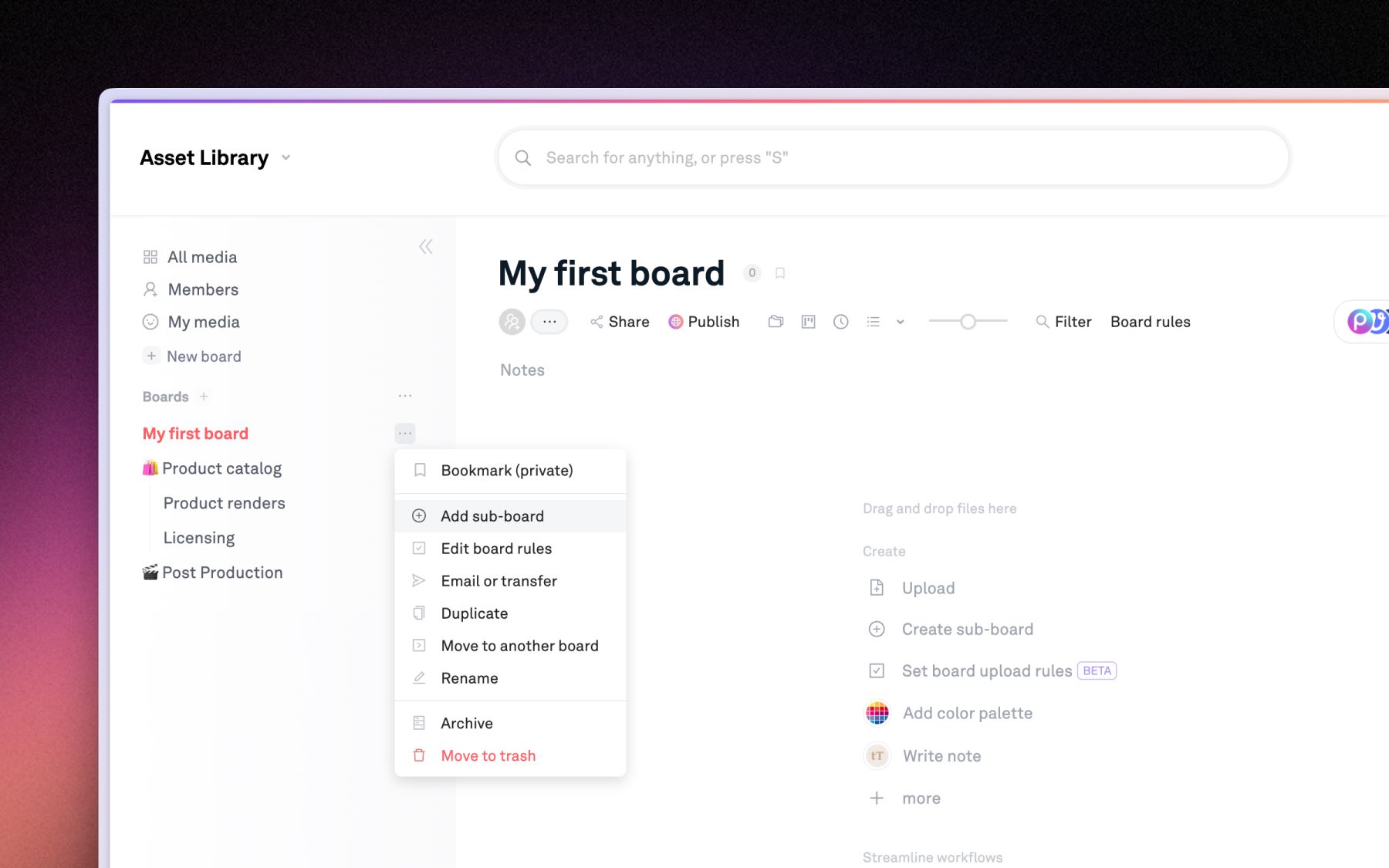
Your top-level structure should be organized by function, never by person or by date. Boards named after people become orphaned the moment that person leaves. Boards named by month bury the newest work at the bottom. Organize by the job the asset does, and the shelf still makes sense in two years.
A starter DAM folder structure, five top-level boards deep:
- Brand Core. Logos, fonts, color values, guidelines, templates. The stuff every project pulls from.
- Product. One sub-board per product line or SKU family. This is your source of truth for pack shots and product photography.
- Campaigns. One board per campaign, with sub-boards by channel (web, paid social, email, retail). Campaigns are where most cross-referencing happens.
- Shoots and Raw. Unculled, unedited source material, filed by shoot name or date. Keeps raw volume out of your finished-work views.
- Delivered. Approved, final, client-ready assets. The board you hand to a stakeholder without worrying what they will find.
Keep the tree shallow. Three levels is plenty. Depth is where structure goes to hide, because the deeper a file sits, the more the path has to be remembered rather than searched. The board decides the broad neighborhood. Metadata does the precise finding.
Which custom fields belong in your metadata taxonomy?
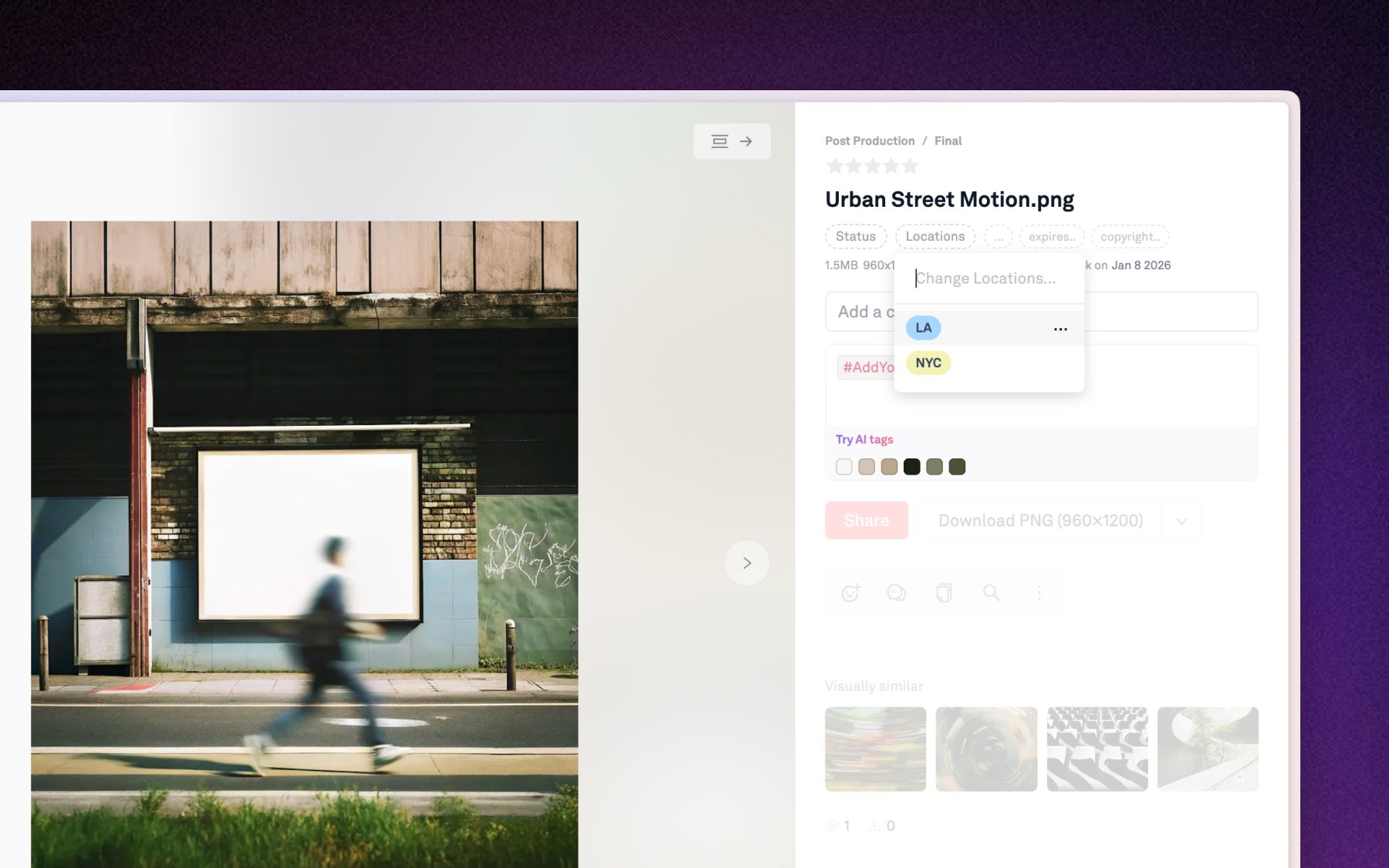
Custom fields are the load-bearing layer of the taxonomy, because they turn facts about an asset into filters you can query. Custom fields for assets are typed, structured metadata (a Status, a campaign, a date, an option list you define) that attach to the file itself. Anything you can set, you can filter by. This is the difference between a note in a filename and a fact the system understands.
Here is the starter metadata taxonomy for creative files. Copy this table as your Layer 2:
| Field | Type | Starter values | The question it answers |
|---|---|---|---|
| Status | Single-select | Draft, In Review, Approved, Archived | Is this ready to use? |
| Campaign | Multi-select | Spring Launch, Always-On Social, Retail 2026 | What is this for? |
| Product / SKU | Single or multi-select | Your live SKU list | Which product is in it? |
| Usage rights | Single-select | Owned, Licensed (expires), Internal only, Cleared for paid | Can we use it, and where? |
| Channel | Multi-select | Web, Paid social, Email, Retail, OOH | Where does it run? |
Five fields is deliberately few. A taxonomy that asks for fifteen fields per upload gets abandoned in a week. Start with the four the whole team already argues about (status, campaign, product, usage rights), add channel if you run paid media, and resist the rest until you feel a real gap. Status is worth special attention: it is single-select, it powers a Kanban view of your pipeline, and it answers the single most common question in any review chain, which is "can I use this yet?"
Usage rights is the field most teams skip and most regret. A photo cleared for internal decks is not cleared for a paid billboard, and the only place that distinction is safe is on the asset record, not in someone's memory.
What asset naming and tagging system should you use?
Your naming and tagging system should be lean, consistent, and machine-readable, because metadata carries the load that filenames used to. Once custom fields hold status, campaign, and rights, the filename no longer has to. That frees your naming convention to do one job well: identify the asset at a glance when it lands on a desktop.
A filename pattern that works:
brand_campaign_descriptor_v01
For example, stur_springlaunch_hero-bottle_v02. Lowercase, underscores between segments, a zero-padded version number at the end. No spaces, no client-specific shorthand only one person understands. That is the whole convention. Do not encode status or rights in the filename, because those change and the filename should not.
Tags are the open, descriptive layer for everything a fixed field cannot hold: #heroImage, #lifestyle, #ugc, #socialReady. Three rules keep a tag system from rotting:
- No spaces. Use camelCase or hyphens. A multi-word tag is a source of near-duplicates.
- Tags are case-insensitive, so "BRoll" and "broll" are the same tag. Pick one style and move on.
- Fields for finite, tags for infinite. If the list of possible values is closed (a status, a channel), make it a field. If it is open and descriptive (a mood, a subject), make it a tag.
The line to hold is simple. Fields are the vocabulary you control. Tags are the vocabulary you let grow.
How do you make the structure self-maintaining?
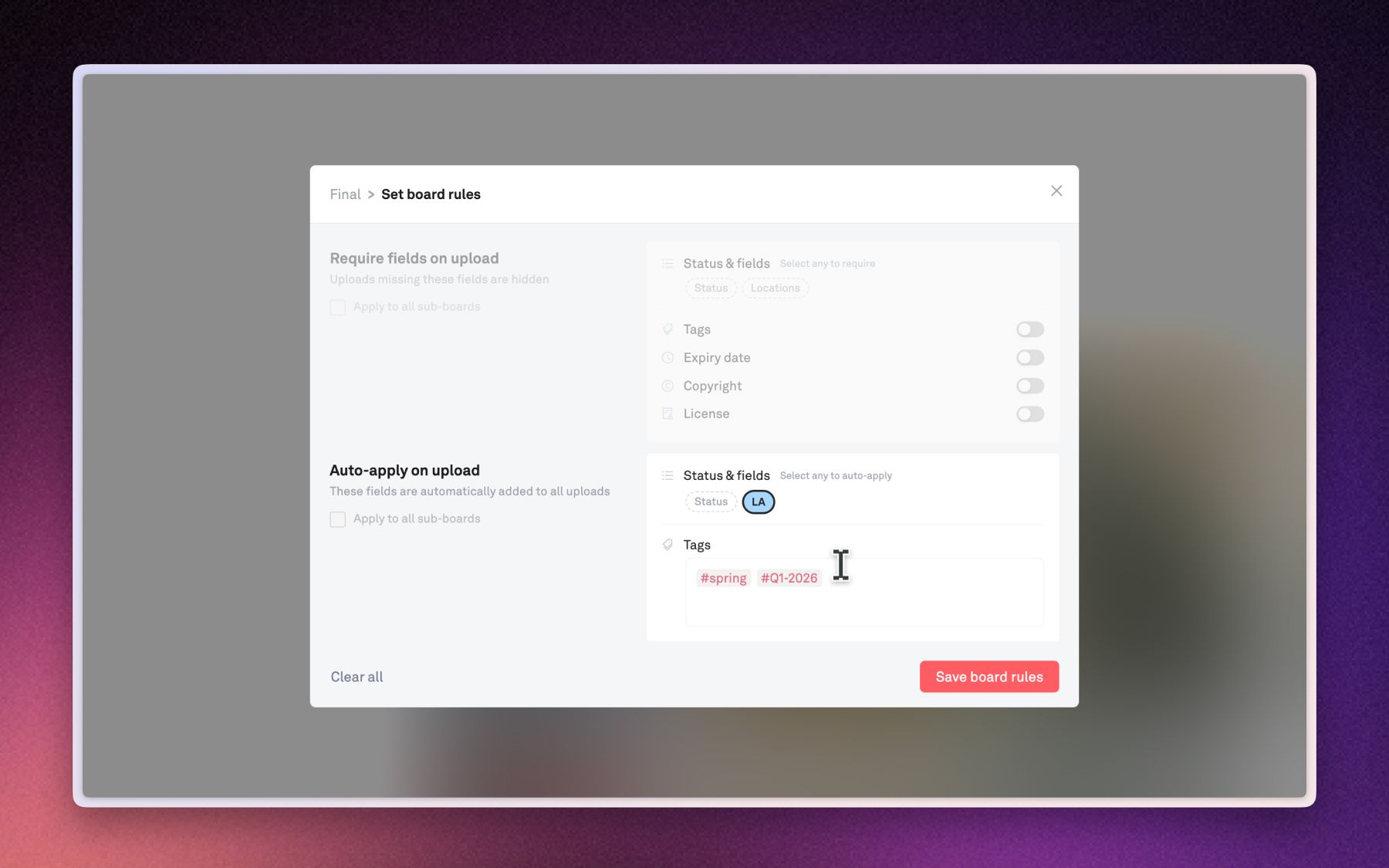
A taxonomy is self-maintaining when new files get tagged and placed at upload time, not in a cleanup sprint three months later. Every system in this post decays the same way: uploads outpace attention, labeling slips, and the library quietly becomes a folder no one can search. The fix is to move the work to the door. Three mechanisms do that.
AI auto-tagging fills the descriptive layer on its own. The moment an asset lands, Playbook reads the actual pixels and writes descriptive tags across 16+ dimensions, including visual style, color palette, product, talent, and usage cues, with no one stopping to type them. Untagged files are invisible files, and auto-tagging means nothing is invisible from the moment it arrives.
Custom trained tags teach the system your vocabulary. Generic AI knows "beverage" and "bottle." It does not know your SKU numbers or internal campaign codes. You pin a managed tag, confirm a handful of matches, and Playbook fans that label out across the archive by visual similarity. That is how "Product / SKU" in the taxonomy above stays populated across thousands of assets without manual filing.
Board upload rules enforce the structured layer. On any board, you can set rules that auto-apply tags and a status to every new file, and require fields (like usage rights) before a file counts as complete. Files missing required info stay hidden, even in a shared view, until someone fills them in. Set a rule on your Campaigns board once, and every drop gets stamped with the campaign and flagged if its rights are blank. One caveat worth stating plainly: rules run per board, not org-wide, so you apply them to the boards that matter rather than to the whole workspace at once.
Together these three make the taxonomy hold by construction instead of by discipline. The AI describes, the trained tags identify, and the rules require. Your team keeps making work, and the structure keeps up.
How do you find anything once the metadata is in place?
The payoff of a good taxonomy is retrieval: every field and tag you invest in becomes an instant, repeatable slice of the library. Filtered search lets you narrow any board by tags (with AND or OR logic), custom fields, uploader, and date range. "Approved, Spring Launch, paid-social, uploaded this week" stops being a scavenger hunt and becomes four clicks. On Team plans and up, conversational AI search lets you describe what you need and pull buried campaigns back by what they contain, not what they were named.
Two teams show the range of this.
Dyla Brands, the beverage company behind Stur, Dole, Ocean Spray, and Happy Viking, manages 15,000+ assets across a SKU-heavy portfolio and reaches over 20 million U.S. households a year. They structure Playbook by category with role-based access, so onboarding an external agency is a folder-access grant instead of a manual asset hunt. As Senior Design Manager Emma Madia put it, "what is this magic? It's so easy!" For a consumer brand juggling this many product lines, a DAM built for consumer brands is what keeps the catalog searchable.
Block Renovation, a PropTech platform in Brooklyn, migrated 250,000+ assets and tags project photography by market (New York, Boston, Chicago, and more), by project type (bathroom, kitchen, whole house), and by homeowner. With one dedicated creative lead against a quarter-million assets, tagging is the only thing that makes the volume navigable. Brand Design Lead Molly's advice on structure: "Start sooner rather than later."
She is right, and it is the whole argument for this kit. The structure is easiest to build before the library is large.
The setup checklist (save this)
Work through these steps in order. Each layer depends on the one above it, so resist jumping ahead.
- Draft five top-level boards by function: Brand Core, Product, Campaigns, Shoots and Raw, Delivered.
- Create the five starter custom fields: Status, Campaign, Product / SKU, Usage rights, Channel. Use the values in the table above as a starting point.
- Set your Status options to Draft, In Review, Approved, Archived, and switch a board to Kanban to see your pipeline.
- Write down the naming convention (
brand_campaign_descriptor_v01) and pin it where the team uploads. - Agree on tag rules: no spaces, lowercase, fields for finite vocabularies and tags for open ones.
- Turn on AI auto-tagging so every upload is described automatically.
- Pin your first custom trained tags for your top SKUs or product lines.
- Add a board rule to your Campaigns board: auto-apply the campaign tag, require a usage-rights value.
- Save one filtered view you use weekly (for example, "Approved + This campaign + Social").
- Review in 30 days. Add a field only where you felt a real gap, and remove any nobody used.
Ten steps, one afternoon. The result is a library that gets more organized as it grows instead of less.
What does this cost, and where do the AI pieces start?
Board structure, custom fields, tags, and board rules are available across Playbook's plans; the AI layer of the kit starts on the Team plan. At the time of writing, the published pricing runs Free ($0, 100GB, up to 300 assets), Pro ($120 per year, 2TB), Team ($240 per year per member, 3TB), and Business ($4,800 per year flat, 15TB, unlimited members, unlimited board rules). Enterprise is custom and adds bring-your-own-storage.
The dividing line matters for this kit. You can build the taxonomy, the naming system, and board upload rules on any plan. AI auto-tagging and conversational search, the pieces that make the structure self-maintaining, start on Team, where Playbook Intelligence and AI tagging for images and videos switch on. Guests stay free on every plan, so the reviewers and clients who read your library never cost a seat. Storage grows in 1TB increments at $25 per month rather than forcing you up a tier. Always re-check the live pricing page, since plans change.
If you want the kit stood up on your own assets, schedule a demo and we will map your taxonomy with you.
Frequently asked questions
How do you structure a digital asset library from scratch?
Start with five function-based top-level boards, add five custom fields (status, campaign, product, usage rights, channel), set a lean filename convention, and turn on rules and AI tagging so new files label themselves. Build the structure before the library is large, because retrofitting a big library is the hard version.
What is the difference between metadata, tags, and custom fields?
Custom fields are typed, structured metadata with finite values you control (a status, a campaign, usage rights) and they double as filters. Tags are open, descriptive labels that can grow freely. Metadata is the umbrella term for both. Use fields for closed vocabularies and tags for everything else.
What is the best folder structure for a DAM?
Organize top-level boards by function (brand, product, campaigns, raw, delivered), never by person or date, and keep the tree about three levels deep. Let boards define the broad neighborhood and let metadata do the precise finding. A shallow structure paired with strong fields beats a deep folder tree every time.
How do you keep an asset library organized as it grows?
Move labeling to upload time. AI auto-tagging writes descriptive tags automatically, custom trained tags apply your SKUs across the archive, and board upload rules auto-apply and require fields so nothing enters unlabeled. The structure then holds by construction instead of relying on anyone remembering to file.
Do I need a naming convention if I have good metadata?
Yes, but a lean one. Once fields carry status, campaign, and rights, the filename only needs to identify the asset at a glance, so a simple brand_campaign_descriptor_v01 pattern is enough. Do not encode changing facts like status in filenames, because filenames should not change and statuses do.
Where should usage rights live in a taxonomy?
On the asset itself, as a single-select custom field (Owned, Licensed, Internal only, Cleared for paid). Rights are the highest-stakes fact in a creative library and the easiest to get wrong from memory. A board rule that requires the field before a file counts as complete keeps the whole library legally legible.
Start with structure
Build the shelves before you need them. A metadata taxonomy is the one investment in a creative library that pays back more the larger you get, and it is easiest to set up while the library is still small. Copy the tables above, run the checklist, and let AI tags and board rules keep it filled in. When you want it applied to your own assets, schedule a demo.