
The days of chaotic storage are, thankfully, a thing of the past. Now, creatives can store thousands of files in the cloud, quickly and easily accessing them without having to rummage through a desktop of zip files, or that one USB drive that might have been through the wash.
Cloud storage is an essential part of the creative toolbox, and new cloud services have sprung up as an increasing number of companies embrace the technology. They’re a place to build a digital archive of past and ongoing projects, as well as collaborate with coworkers and clients – all while dialing into some much-needed organizational zen.
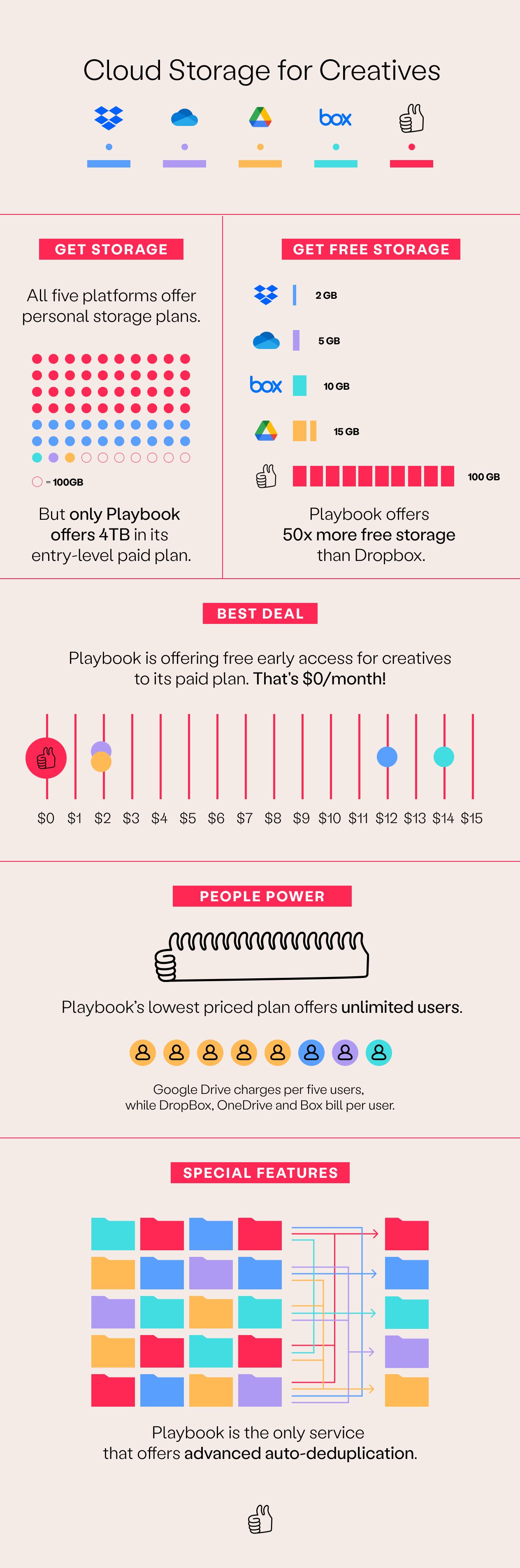
Some creatives will need significant storage space and speedy uploads for sizable .indd or .psd files, while others might be part of complex branding projects that require regular input and collaboration. The Playbook infographic below compares five storage platforms: Playbook, Dropbox, Google Drive, Microsoft OneDrive and Box, to see which offers the most space, the best value and all the other bells and whistles creatives need to streamline their creative flow.

What creatives actually need from cloud storage
The best cloud storage for creatives is judged on three things general-purpose storage was never designed for: whether you can find an asset without remembering its filename, whether large media files move without friction, and whether anything useful happens to the work after it is delivered. Capacity is the easy part. Every platform below sells terabytes.
The infographic above compares the headline numbers. What follows is the part the numbers do not capture.
Dropbox
Dropbox is the most reliable sync engine of the group, and for teams whose files are documents that is often enough. For creative libraries it has one structural limitation: it treats a 4GB video file and a spreadsheet as the same kind of object, so organisation stays entirely manual. If you are weighing a move specifically off Dropbox, the detailed Dropbox comparison goes deeper.
Google Drive
Drive wins on collaborative documents and on price for teams already inside Google Workspace. Its weakness for creative teams is browsing. Thumbnails are inconsistent across formats, previews for design files are limited, and search leans heavily on filenames and OCR rather than on what an image actually depicts. The Google Drive comparison covers the migration path.
Microsoft OneDrive
OneDrive makes sense when the organisation is standardised on Microsoft 365 and IT governs storage centrally. It is the strongest option here for compliance and device management. It is the weakest for visual work: previewing layered design files and reviewing video are not what it was built to do.
Box
Box is the enterprise governance choice, with mature permissions, retention policies, and audit trails. Creative teams typically encounter it as a corporate requirement rather than a preference, and end up running a second, faster tool alongside it for day-to-day production work.
Playbook
Playbook is a visual home for creative work rather than a folder tree with previews attached. It indexes what is inside each asset, so you can ask for *"all assets featuring models"* or *"every file tagged #socialReady"* and get results based on visual content rather than on whether the filename was right.
The difference that compounds: who does the filing? Set a board rule once and every new upload is tagged and placed automatically. That is the gap between a library that stays organised and one that degrades the moment a deadline hits.
Invictus Media, a seven-person production house in Des Moines, moved off a 5TB Dropbox plan and now runs a library of more than 33,000 assets. Roughly 90% of their work involves video, so browsing rather than searching by name is the whole job.
Dorst & Lesser, a 75-person social agency in Amsterdam, moves around 400 assets a week across 40 clients and 30 influencers, with about 25,000 views a month on shared links. Co-Founder Robert Withagen: "Speed is very important because we are in the social business."
At the time of writing, Playbook is free to start, Pro is $18 per member per month or $120 per year, Team is $25 per member per month or $240 per year, and Business is a flat $500 per month or $4,800 per year with unlimited members. Guests never take a paid seat, which matters when your storage bill is really a collaboration bill. Current tiers are on the pricing page.
Curious how your library would look? Schedule a demo.
How to choose cloud storage as a creative team
- Count the guests, not just the seats. Agencies and brands share constantly. Platforms that charge per collaborator quietly become the most expensive option on the list.
- Test search with a file you did not name. Upload a shoot, wait a week, then try to find one frame. This single test separates storage from asset management faster than any feature grid.
- Check what large downloads actually do. Original-quality delivery matters. Compression applied silently on the way out is a real problem for print and broadcast work.
- Ask where approved work goes. If the answer is "the project folder", you will re-shoot things you already own.
- Match governance to your actual obligations. If you genuinely need retention policies and legal hold, weight that first. If you do not, do not pay for it in usability.
Frequently asked questions
What is the best cloud storage for creatives?
It depends on what dominates your work. Teams standardised on Microsoft or Google usually keep those platforms for documents. Teams whose output is images and video generally need a visual library on top, because filename-based search fails at scale.
Is cloud storage the same as a DAM?
No. Cloud storage syncs and stores files. A digital asset management platform understands what is in them, so it can tag, search, permission, and version by content. See DAM vs cloud storage for the full comparison.
How much cloud storage does a creative team need?
Less than most teams assume, and the number matters less than duplication. Libraries without deduplication and visual search accumulate multiple copies of the same asset, so capacity gets consumed by files nobody can find.
Can I keep my existing storage and add a visual layer?
Yes. Many teams keep Google Drive or SharePoint for documents and run a creative library alongside it for visual work, importing from the existing platform rather than migrating everything at once.