
TL;DR: How to share creative work with clients comes down to five moves. Build a branded gallery, control the link, collect precise feedback, gate what the client sees, and keep the delivery live after sign-off. Do them well and the hand-off stops being a file transfer and becomes the reason you get hired again.
Delivery is the last thing a client feels and the first thing they remember. A zip file dumped in an email says the project is over. A branded gallery that opens on any device, takes comments in the exact spot, and stays live after approval says you run a tight shop. That difference is quiet, and it decides referrals.
This is the full delivery arc, step by step, with the specific controls that make each step land. Want to see it on your own work instead of reading about it? Schedule a demo and bring a real project.
Why does client delivery decide whether you win the next project?
Client delivery is the moment your creative work stops being your work and starts being their impression of you. The files were always going to be good. What the client remembers is whether opening them felt considered or chaotic.
Most delivery still happens through channels built for storage, not presentation. A Drive folder shows your naming conventions and your rough cuts. A WeTransfer link expires before the client circles back. An email thread scatters feedback across twelve replies with no line to the frame anyone means. None of it looks like the brand the client just paid for.
The reframe is simple. Review is a moment; the library is forever. Your delivery surface should be part of the library, not a throwaway export. When the gallery, the feedback, the approvals, and the final assets all live in one record, the next project starts from a system instead of a search through your sent folder. Teams delivering client work as an agency feel this most, because they run the same loop across dozens of accounts at once.
Step 1: How do you build a branded client delivery gallery?
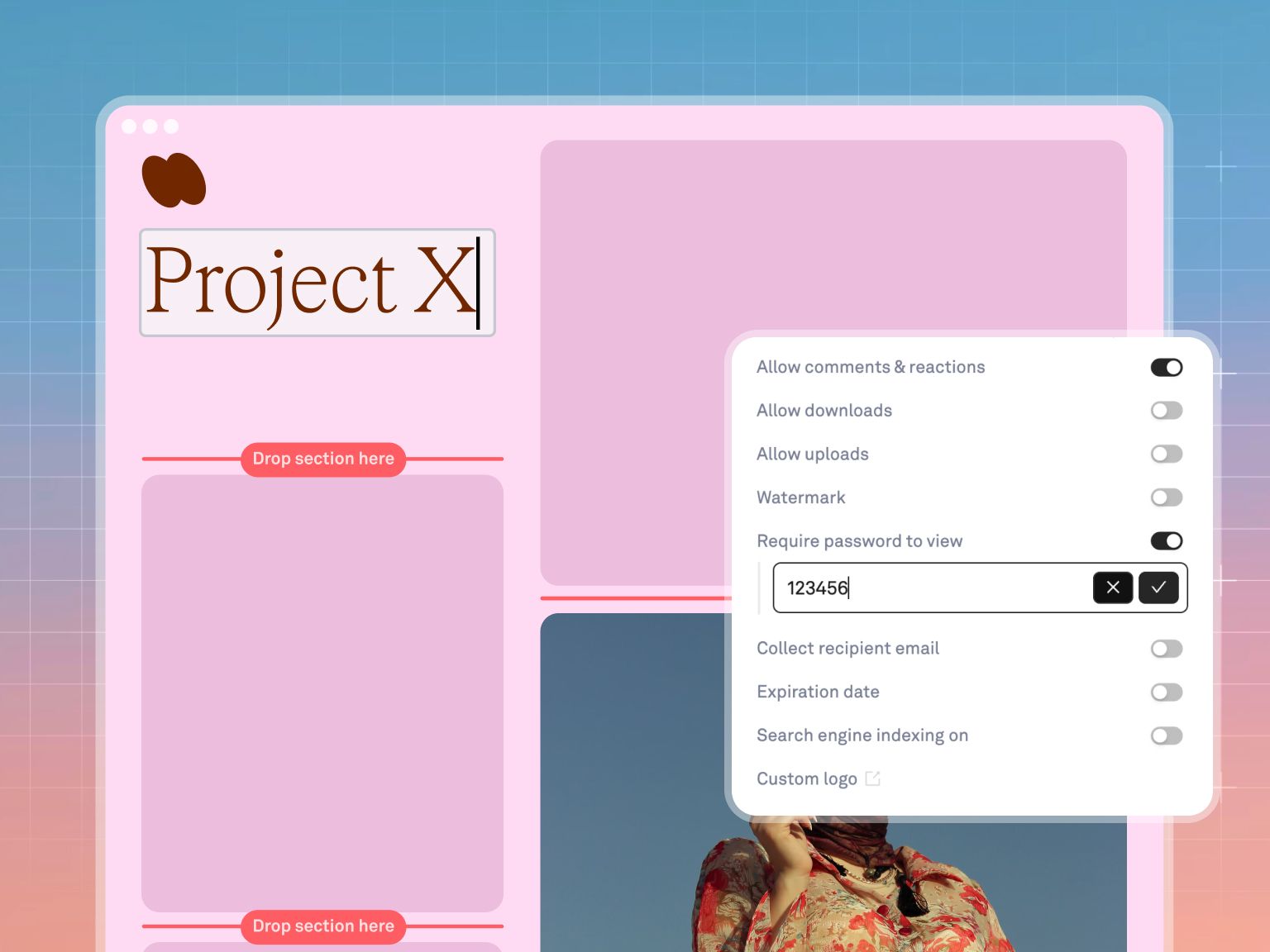
A client delivery gallery is the branded public page your board becomes when you send it outward, carrying your logo, a cover image, a memorable URL, and a scannable QR code instead of Playbook's chrome. In Playbook, publishing a board turns it into a polished, public-facing webpage in a few clicks, no account required for the person you send it to.
Here is the flow:
- Open the board, give it a clear name and description, and hide anything not ready to show.
- Hit Publish to turn the board into a real page, then pick a template.
- Set a custom slug, upload your logo, and choose a cover image so the page reads as your brand, not a generic file list.
- Toggle Show QR Code when you want to hand the gallery off in person or in a printed leave-behind.
- Copy the link and send it. Any later edit to the internal board shows up on the public page in real time, so you never re-send a "final v3" URL.
Three details matter. The page is genuinely live, meaning the board and the public gallery are the same content, so a swapped hero image updates instantly. Custom logo and cover branding come in on the Team plan and up, while the public page itself publishes on every tier. And the result behaves like a branded client portal, not a shared folder. Browse the delivery galleries and brand portals in the template gallery if you want a starting layout instead of a blank board.
Step 2: How do you send files to clients securely?
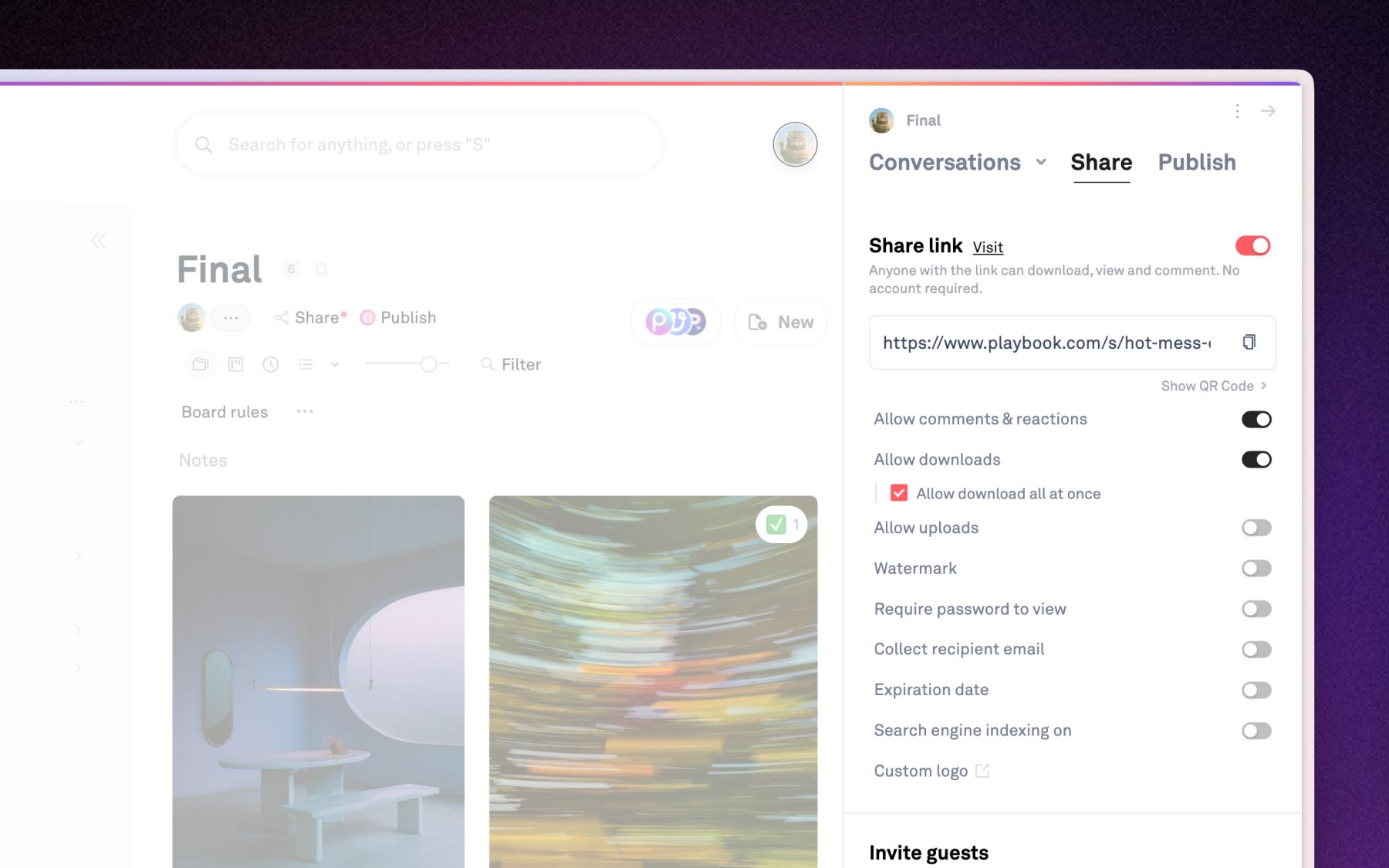
You send files to clients securely by putting controls on the link itself, so a single share becomes a permissioned front door rather than an open one. Playbook's Link Controls let you set a password, an expiration date, a text watermark, and independent toggles for downloads, comments, and uploads on any shared link.
Set these per delivery based on what the work needs:
- Password and expiry for sensitive or embargoed work, so a forwarded link does not live forever.
- Text watermark (size, position, color, opacity) across preview images while a project is still in review.
- Download toggle to decide whether the client gets original files now or only after final approval.
- Email capture before access, when you want to know who opened the gallery.
- Presets you save once and reuse, so every new client link starts compliant instead of hand-configured.
Two facts to plan around. Full link controls are a Pro-and-up capability, and on the Free plan links carry an automatic 30-day expiry, which is the usual reason a client reports "the link stopped working." Org admins can also set workspace-level defaults for watermark and link previews, so a 40-person shop delivers with the same guardrails on every link without trusting each person to remember. The watermark is text-based, not an image overlay, so treat it as a review deterrent rather than DRM.
Step 3: How do you collect feedback clients can actually act on?
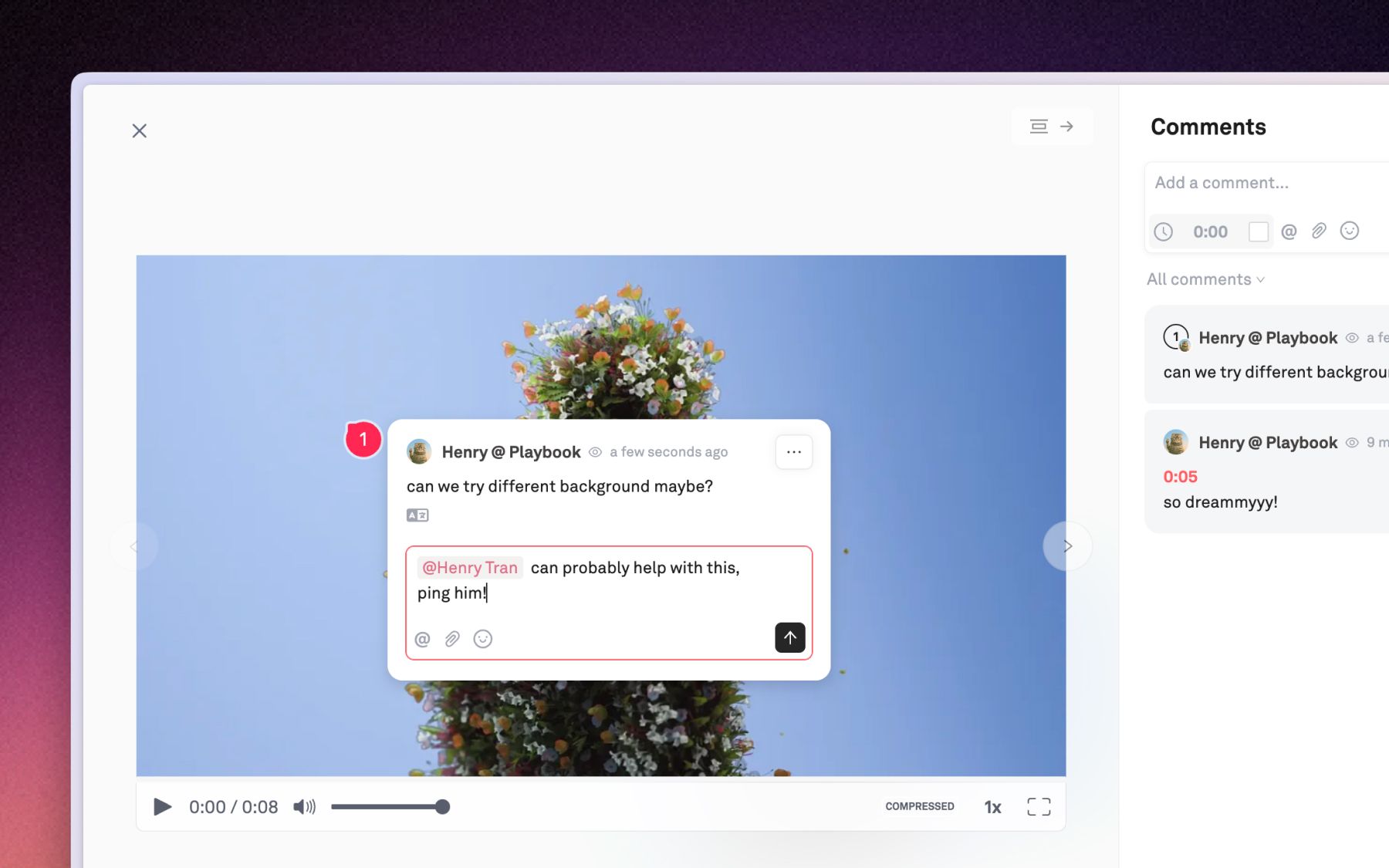
You collect actionable feedback by pinning it to the exact pixel and the exact moment, so "make the logo bigger" becomes a box drawn around the logo on frame 00:42. Playbook's advanced comments let a client drop a pin at a point, draw a box over a region, or free-draw a path on an image, and on video the comment auto-attaches to the precise frame and timecode.
This is what turns a vague review round into a clean client proofing workflow:
- Pixel-pinned image comments in pin, box, or draw modes, so feedback points at the file, not around it.
- Frame-accurate video comments that capture the timecode automatically, which matters when a note applies to one second of a 90-second cut.
- Attachments, link previews, and machine translation on comments, plus per-person read/unread tracking so nobody re-litigates a note that was already handled.
Dorst & Lesser, a 75-plus-person Amsterdam social agency, runs this across roughly 400 new assets a week for 40-plus clients and 30-plus influencers. Co-founder and creative director Robert Withagen points to precise video feedback directly: "One feature which is very nice is how you can give feedback per second." Because the same platform holds every version, feedback, and approval in one record, the client marks up the work where it lives instead of in a parallel doc. Playbook keeps review, comments, and approvals in one place rather than three tools stitched together.
Step 4: How do you control what clients see before they see it?
You control what a client sees by making approval a state on the asset itself, so a shared board can hold your works-in-progress internally while the link exposes only the approved subset. In Playbook, marking assets approved (or hiding and showing them) gates which files surface on a shared gallery, no separate "client-safe" board required.
The mechanics are worth getting right:
- Select the assets that are client-ready and set them Approved, or unapprove to pull one back.
- Share the board and configure the link to show approved assets to external viewers.
- For a stack of variants, approving any child marks the group approved, and the gallery shows the first approved child.
Two things make this durable. Approval lives on the asset record, so "is this signed off?" is answerable by anyone who opens the file, not just the person who clicked the button. And a timed-reveal option (scheduled approval) is in beta for embargoed drops, letting an asset become visible on shared links at a chosen future time. Keep the approval state separate from the informal checkmark reaction in your head: the reaction is a social signal, approval is the thing that actually gates the gallery.
Step 5: How do you keep a delivered gallery live after sign-off?
You keep a gallery live by embedding the board itself rather than exporting images, so the client-facing surface stays in sync with your source of truth automatically. Playbook's Embed 2.0 drops a board onto any external site as a carousel or gallery iframe that refreshes its own content, so a board edit flows through without re-embedding.
Use the right tool for each afterlife of the work:
- Embed 2.0 for a live slice of the library on a portfolio page, campaign site, or client microsite. Downloads are always disabled in an embed, so it stays a presentation surface, and custom branding is available on Team and up.
- Permalinks and CDN URLs when a client or their developer needs a permanent, hotlinkable address for a single asset, for example a hero image in their CMS or a logo in an email signature. For images the URL is served through imgproxy, so a caller can request a specific width and height and get a resized rendition on the fly.
The Vault Stock, a stock platform with 50,000-plus assets and 3,000-plus monthly members, embedded Playbook published pages straight into their existing Squarespace site and used secure share links to keep content gated behind their membership paywall, all without a full platform migration. Creative 2IC Anna Hamilton put it plainly: "Playbook really ticks all the boxes for us." That is the payoff of a delivery surface that is part of the library: the same board can be a private client gallery today and a live embed on a public site tomorrow.
What does it cost to invite the whole review chain?
It costs nothing per reviewer, because guests comment, review, and download without a paid seat. This is the quiet edge in a client review workflow: the account lead, the client's brand manager, their legal reviewer, and the freelance editor can all join the same gallery, and on Pro and up guests are unlimited (verify current terms on the pricing page, true at the time of writing).
That matters because most review tools meter the people who give feedback. Every extra stakeholder is another seat, so teams quietly cut the review chain to control the bill, and the note that mattered never gets made. Playbook's model is the opposite: invite the whole review chain without watching a per-seat meter.
A few numbers to anchor the decision. The Free plan includes 100GB and up to 300 assets with no credit card, enough to run a first real delivery. Dorst & Lesser store 59,000-plus assets and clear 25,000 monthly views on the platform, and they download original-quality files that an older tool used to compress. Across Playbook, 96% of users report spending less time hunting for files after switching (Playbook's own reporting). The line item you stop paying is the one that never appeared on an invoice: the hours a senior creative spends being a librarian and a link wrangler.
The client delivery checklist
Save this and run it before every hand-off. It is the whole arc on one screen.
- [ ] Curate the board. Hide rough cuts, name assets clearly, order the best work first.
- [ ] Brand the gallery. Custom slug, your logo, a cover image, and a QR code if it is going in person.
- [ ] Set the link controls. Password or expiry if sensitive, watermark on in-review previews, downloads on only when you mean it.
- [ ] Gate visibility with approvals. Only approved assets surface on the link; hold embargoed drops for a timed reveal.
- [ ] Turn on comments. Confirm pixel-pinned and frame-accurate feedback are enabled so notes land on the exact spot.
- [ ] Invite the whole chain. Add every reviewer as a guest, no per-seat math.
- [ ] Plan the afterlife. Embed the live board where the work will live on, or mint permalinks for assets others need to hotlink.
- [ ] Keep it live. Deliver from the board itself so edits update the client's view with no re-send.
Frequently asked questions
How do you share creative work with clients without making them create an account?
Publish the board as a client gallery and send the link. The recipient opens a branded public page in the browser with no login and no Playbook account. You control access with a password, an expiry date, or an email gate on the link itself if the work is sensitive.
What is the best way to send large video files to clients securely?
Share the board as a link with a password and, if needed, an expiration date, and keep downloads toggled off until final approval. Clients stream production video in the browser and leave frame-accurate comments, so you send the file itself only when the cut is signed off.
How do clients leave feedback on specific parts of an asset?
They pin a comment to an exact point, draw a box over a region, or free-draw on an image, and on video the comment auto-attaches to the precise frame and timecode. Every note is tied to the spot and moment it refers to, which removes the guesswork from a review round.
Do clients need a paid seat to review work in Playbook?
No. Guests comment, review, and download without a paid seat, and on Pro and up guests are unlimited (confirm current terms on the pricing page). You can invite the account lead, the client, their legal reviewer, and outside collaborators to the same gallery without adding billable members.
Can a delivered gallery stay up to date after the project ends?
Yes. Because the public gallery and the internal board are the same content, any edit updates the client's view in real time with no re-send. You can also embed the live board on an external site, where it refreshes automatically, or mint permanent CDN links for individual assets.
Deliver work that wins the next project
Your creative work is a living, breathing beast, and your delivery should reflect that. Build the branded gallery, control the link, collect precise feedback, and keep it live, all from one library. Schedule a demo and run your next client hand-off on Playbook.