
A disconnected creative workflow is what happens when a single asset has to pass through four or five separate tools before it's done: a design tool for the file, a chat app for feedback, an inbox for sign-off, and a shared drive for the final version. None of those tools talk to each other, so nobody can look in one place and answer a simple question: is this the version we approved?
That gap is a structural problem, not a discipline problem. You can hire the most organized creative director in the industry and still lose hours a week to it, because the issue isn't who's careless. It's that status, feedback, and version history live in different systems that were never built to share a record.
This guide walks through what a disconnected workflow actually costs, the four structural causes behind it, what a connected system needs to fix it for good, and a one-week plan you can run to prove it before rolling it out further.
What a disconnected creative workflow actually costs
The cost of a disconnected workflow shows up as lost hours first, then as lost budget, brand risk, and a ceiling on how much your team can grow. None of it is theoretical. Atlassian's State of Teams 2025 survey of 12,000 knowledge workers and 200 executives found that teams waste 25% of their time just searching for answers, at the time of writing. For a creative team, that number gets worse, because a photo or a video comp can't be found with a keyword search the way a document can.
Here's where that time actually goes:
- Speed to market slows down. A two-day delay with one reviewer becomes a two-week slip once you multiply it across five reviewers and three rounds of sign-off, and campaign deadlines rarely move to accommodate that.
- Rework gets expensive. When a team can't find an asset that already exists, the default is to recreate it. A reshot product photo or a re-cut video easily runs into the thousands.
- Brand consistency erodes. Teams default to whatever asset they can find fastest, which is sometimes an outdated logo or an unapproved draft, and that's how off-brand work goes live.
- Growth exposes the gap. Friction that felt minor across three campaigns becomes an operational bottleneck the moment you add a new market, product line, or agency partner.
Schedule a demo to see what a connected workflow looks like for your team, or keep reading for the causes worth fixing first.
The 4 root causes of a disconnected creative workflow
A disconnected creative workflow almost always traces back to one of four structural gaps, not to any one person's habits. If you recognize your team in two or more of these, the fix is infrastructure, not another reminder in Slack.
1. No shared record of what happened to an asset
When a file leaves one tool and enters another, its history doesn't travel with it. The comment thread stays in Slack, the sign-off stays in an email, and the file itself lands in a folder with none of that context attached. Anyone opening it later has no way to tell whether it's approved, in review, or three drafts old.
2. Version history that lives in filenames instead of the system
A file named Hero_FINAL_v3_edited.psd is a guess, not a record. The moment two people edit in parallel, or a version gets shared before it's cleared, there's no single place that shows which copy is current. Teams lose time twice: once hunting for the right version, and again undoing the damage when the wrong one ships.
3. Feedback that isn't tied to the asset it's about
A stakeholder leaves notes in a Loom video. A client marks up a PDF export. A copywriter gets a comment in an email thread. All of that feedback is real, but none of it is attached to the actual file or the specific version it refers to, so the creative team spends more time reconstructing what was said than acting on it.
4. Approval status that only exists in someone's memory
Without a visible status trail, reviewers don't know it's their turn, and work sits waiting for a signal that never comes. Worse, someone often ends up approving a file that already got sign-off three days earlier, because the system has no record of that decision either.
What a connected creative workflow requires
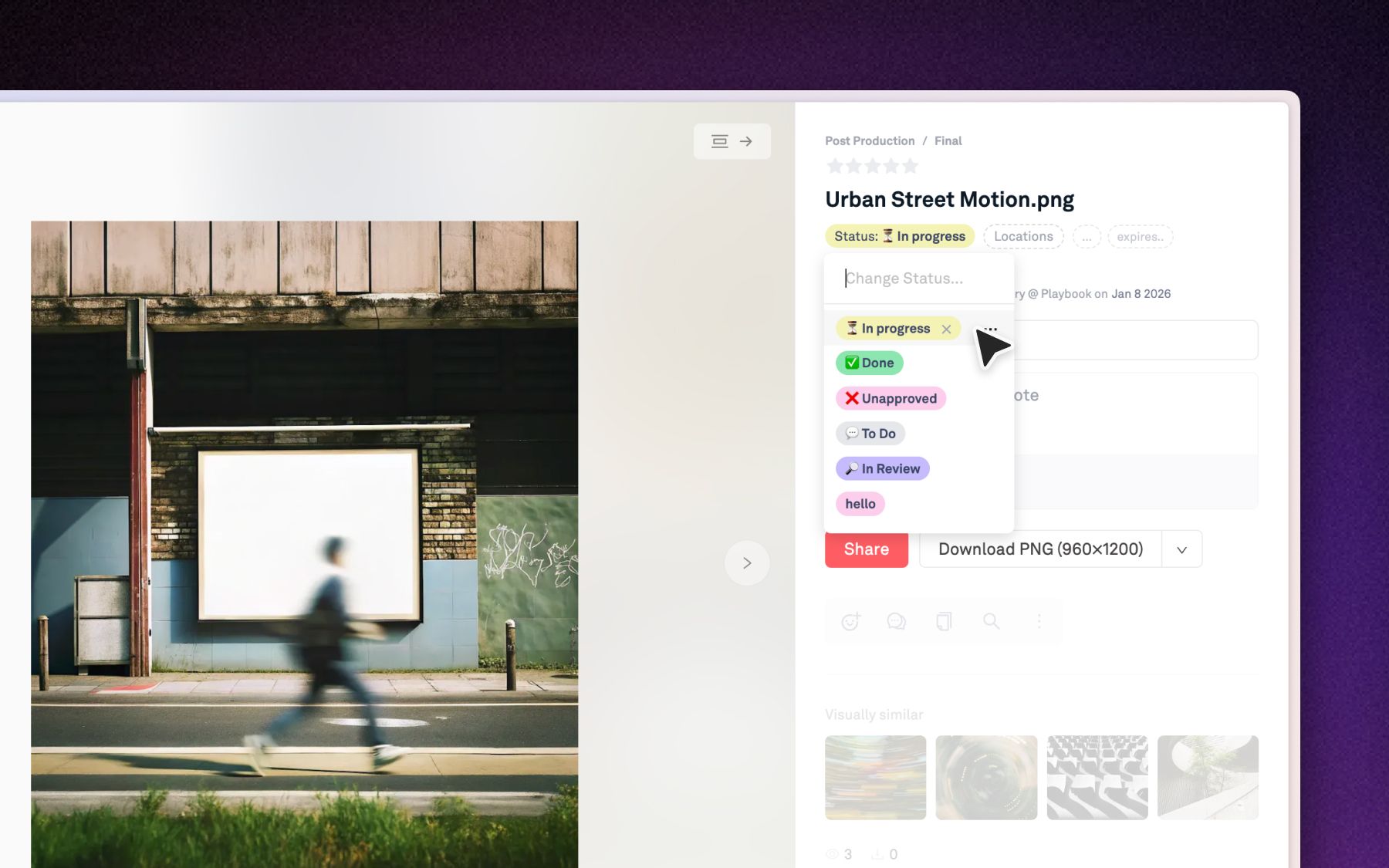
A connected creative workflow attaches status, history, and feedback directly to the asset, so anyone who opens a file can see everything it needs to be trusted and reused. That means four things need to be true of the system you build around:
- One system of record for the asset, not just its storage. Metadata, version history, and approval status need to live on the file itself, not in a spreadsheet next to it.
- Feedback and sign-off attached to the exact version. Anyone opening a file should see who said what, on which iteration, without checking three other tools first.
- Version control that's automatic, not a naming convention. New iterations should stack on the original in order, so the current approved version is never a guess.
- Search that works on what's inside the file. Filenames and folders don't scale. Search needs to understand colors, objects, and text the way a person would describe them.
A one-week plan to reconnect your workflow
This plan is built for a creative director or ops lead to run against one live campaign, so you have a measurable before-and-after in seven days rather than a theoretical rollout plan.
- Day 1: Define your metadata. Decide on the fields that actually matter, campaign, status, owner, usage rights, and apply them to your busiest active folder.
- Day 2: Set approval stages. Build statuses like "In review," "Changes requested," and "Approved," with a saved view for each stakeholder's queue.
- Day 3: Fix your versioning rule. One rule: new iterations get uploaded as a version on the original file, never as a new file with "_v2" in the name.
- Day 4: Move one review cycle onto the asset. Take a live review out of Slack or email and run it in a comment layer attached to the file and its version.
- Day 5: Open self-serve search to the team. Let marketing or brand partners search the library directly instead of pinging a designer for every request.
- Day 6: Replace manual exports with live links. Swap static file exports for links that update automatically when the source file changes.
- Day 7: Measure the baseline. Track review cycle time, rework caused by version confusion, and hours spent searching, then compare it against where you started.
By day seven, you'll have real numbers to justify expanding the system across the rest of your library.
How Playbook keeps creative work connected
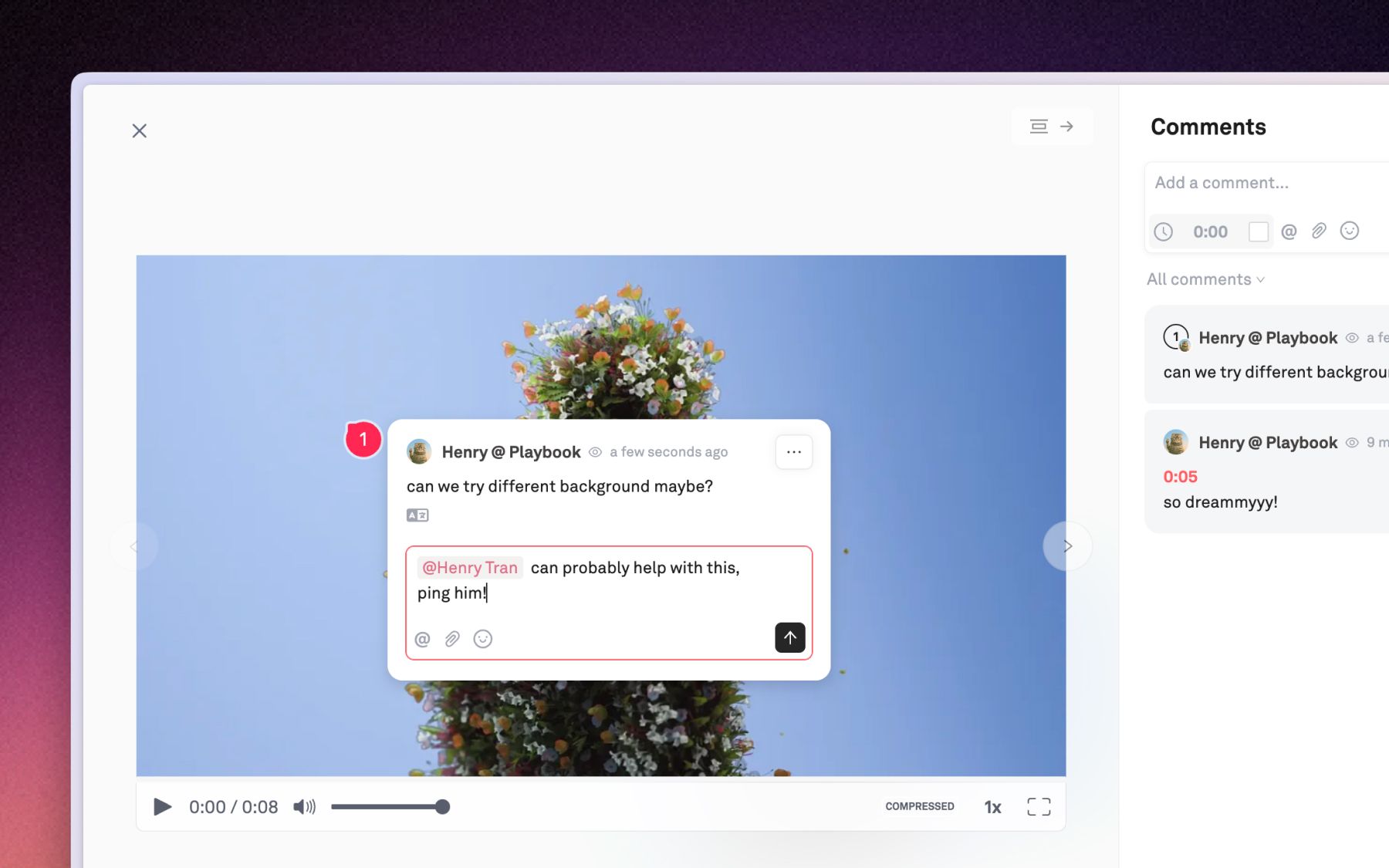
Playbook is a visual home for creative work where status, history, and feedback stay attached to the asset itself, so nothing gets lost in the handoff between tools. Rather than treating storage, review, and search as separate products, Playbook keeps them in the same workspace the file already lives in.
Version stacking groups every iteration of an asset into one evolving history, with the newest version surfaced automatically, so "which one is current" stops being a question anyone has to ask. Comments and approvals attach directly to that version, with custom fields and Kanban-style tracking so a reviewer can see exactly where an asset stands without leaving the board.
Playbook Intelligence is what replaces the file hunt entirely. AI Organize understands every image and video by subject, mood, and brand elements, auto-tags it on upload, and proposes how to sort it into boards, so filing stops depending on whoever happened to upload the file. Sidebar search lets anyone find what they need and act on it immediately: type "all sunset beach shots from the fall campaign" and get straight to a share-ready result. Playbook is also shipping automated org rules and one-click workflows for repeated tasks like culling and tagging, so the system keeps getting less manual over time.
This is how it plays out for real teams. Dorst & Lesser, a 75-person social agency producing roughly 400 assets a week across 40 clients and 30-plus influencers, moved off a slower, harder-to-navigate DAM because feedback and asset delivery couldn't keep pace with a social team's timeline. Co-Founder and Creative Director Robert Withagen put it simply: "Speed is very important because we are in the social business." Centralizing the library and its conversations gave internal teams, clients, and influencers one place to give feedback and approve, instead of five.
Shakti Mat ran into the same root cause at a different scale: a global rebrand with files split across Dropbox, Google Drive, and internal storage, and no single source of truth for what the brand looked like in any given market. Bringing every asset and campaign file into one workspace let agencies in Sweden, New Zealand, and the UK stay visually aligned without a single training session. As Glynn Ryland put it, "It's a system that underpins our brand."
Playbook works for teams of every size. The Free plan covers 100GB and 300 assets with no card required. Paid plans start with Pro at $10 a month per member (billed annually) for solo freelancers, and Team at $20 a month per member for growing teams, which is where Playbook Intelligence, AI tagging, and conversational search kick in. Business runs a flat $400 a month for unlimited members, and Enterprise adds bring-your-own-storage and custom onboarding for teams with existing infrastructure they don't want to rip out. Pricing is current as of this writing and worth confirming on the pricing page before you budget.
Playbook also connects to the creative agency and consumer brand workflows this kind of reconnection plan usually touches first, since client review and multi-market brand consistency are exactly where disconnected workflows show up earliest.
Schedule a demo to walk through the seven-day plan against your own library.
FAQ
What causes a disconnected creative workflow?
It's almost always one of four structural gaps: no shared record of an asset's history, version control that lives in filenames instead of the system, feedback that isn't attached to the file it's about, or approval status nobody outside the reviewer can see.
How much time does a disconnected workflow actually cost?
Atlassian's State of Teams 2025 research found teams lose 25% of the workweek to searching for information, and creative teams tend to lose more, since visual assets can't be found with a simple text search the way documents can.
What does a connected creative workflow look like?
Status, version history, and feedback all live on the asset itself rather than scattered across a chat app, an inbox, and a shared drive, so anyone opening the file can see what it is, whether it's approved, and what changed since the last version.
Can a digital asset management tool fix workflow bottlenecks?
Yes, if it does more than store files. A DAM that adds structured metadata, automatic version stacking, and search that understands what's inside a file addresses the root causes. A DAM that's just a folder structure in the cloud only moves the symptom somewhere else.
How long does it take to reconnect a broken workflow?
A single campaign or your busiest folder can show a measurable before-and-after in a week: define metadata, set approval stages, fix your versioning rule, move one review cycle onto the asset, open up self-serve search, and measure the baseline.
Ready to see it in your own library? Schedule a demo with Playbook.