
Talk to your files and they answer back. That is the shift underway in creative work in 2026. You stop hunting through folders and filenames, and you start describing what you need in plain language to a library that understands what your images and videos actually contain. This post explains what conversational asset search is, why the old folders-and-filenames model broke down, and how Playbook Intelligence turns a search bar into a conversation you can act on. If you run a growing creative library, you can schedule a demo and see it work on your own assets.
Here is the thesis, plainly. Your team's creative work is a living, breathing beast, and your system should reflect that. 10 days of design iterations, 10 weeks of campaign work, and 10 years of brand, taste, and direction, all captured in a single conversation. Playbook brings your work to life.
What does it mean to talk to your files?
Talking to your files means searching and acting on your creative library through natural conversation instead of folder paths. You describe the asset the way you remember it, "moody product shots on a concrete background," and the system returns matches based on what the images actually look like, then lets you move, tag, or share them without leaving the search. In Playbook, this conversational layer is called Playbook Intelligence, and the in-product assistant is named Plippy.
Two things make it a conversation rather than a query box. First, search reads content, not just names, so a visual memory is a valid search term. Second, the results are live: you can chain follow-ups like "PNG files only" or "now build a client link" in the same thread. Searching in Playbook feels more like a conversation than a database query, which is exactly the point. Playbook Intelligence launched in Q2 2026 and is, at the time of writing, in private beta for teams.
Schedule a demo if you want to see conversational search run against a real library rather than a slide.
Why do folders and filenames fail creative teams?
Folders and filenames fail because creatives remember what an image looks like, not what it was named or where it was filed. A nested folder tree assumes every person files the same way and recalls the same path months later, which almost never holds once a library passes a few thousand assets. The result is a senior creative spending part of every week acting as a librarian, and duplicate shoots commissioned because nobody could find the first one.
The numbers make the tax visible. Across Playbook's own reporting, 96% of users say they spend less time hunting for files after switching, and Playbook now supports more than 5,000 teams with 10 or more members. When a production house like Invictus Media describes its old setup, the pain is specific: digging through a mountain of folders, subfolders, and more subfolders, hoping the file you need is in there somewhere. Here is the shift, side by side.
| The old way | Talk to your files |
|---|---|
| Remember the folder and the exact filename | Describe what the shot looks like |
| Tag every upload by hand | AI tags each asset across 16+ dimensions on upload |
| Search matches names, not content | Search matches what images and video actually contain |
| Find a file, then go do the work somewhere else | Find, then move, tag, or share in the same conversation |
| Structure the archive manually, or never | AI proposes a board structure you edit and accept |
Can you search images by describing them?
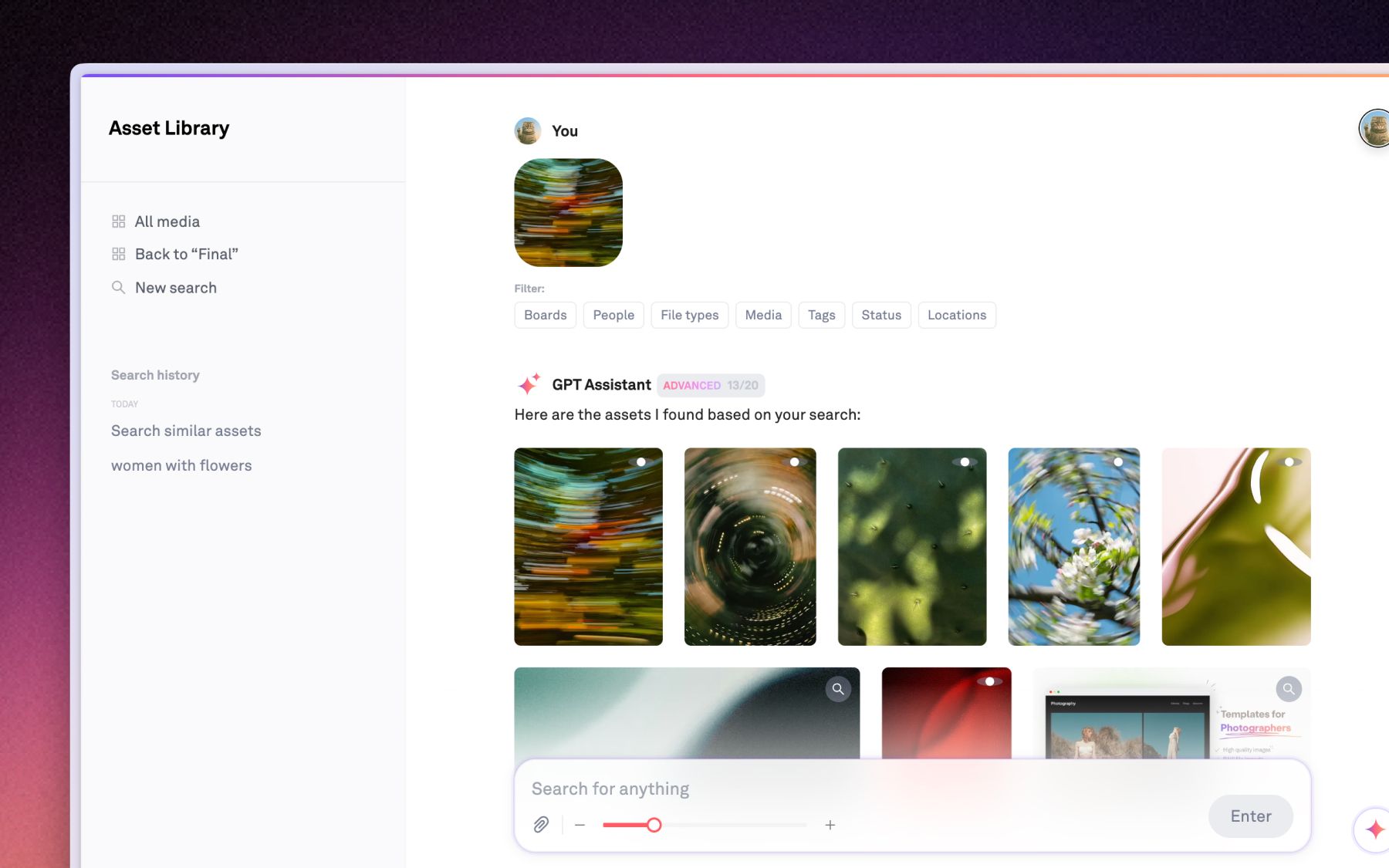
Yes. Natural language image search lets you find visual assets by describing their content, style, or mood, and Playbook matches on the actual pixels rather than the file's metadata. Ask for "all assets featuring models" or "golden hour, beach, drone" and you get results ranked by visual similarity to your description. Under the hood it is a hybrid: semantic search on what the images and video look like, merged with classic full-text matching on titles, tags, comments, and document contents. The site discloses that Playbook relies on OpenCLIP to generate embeddings and GPT to process queries, so this is disclosed technology, not a black box.
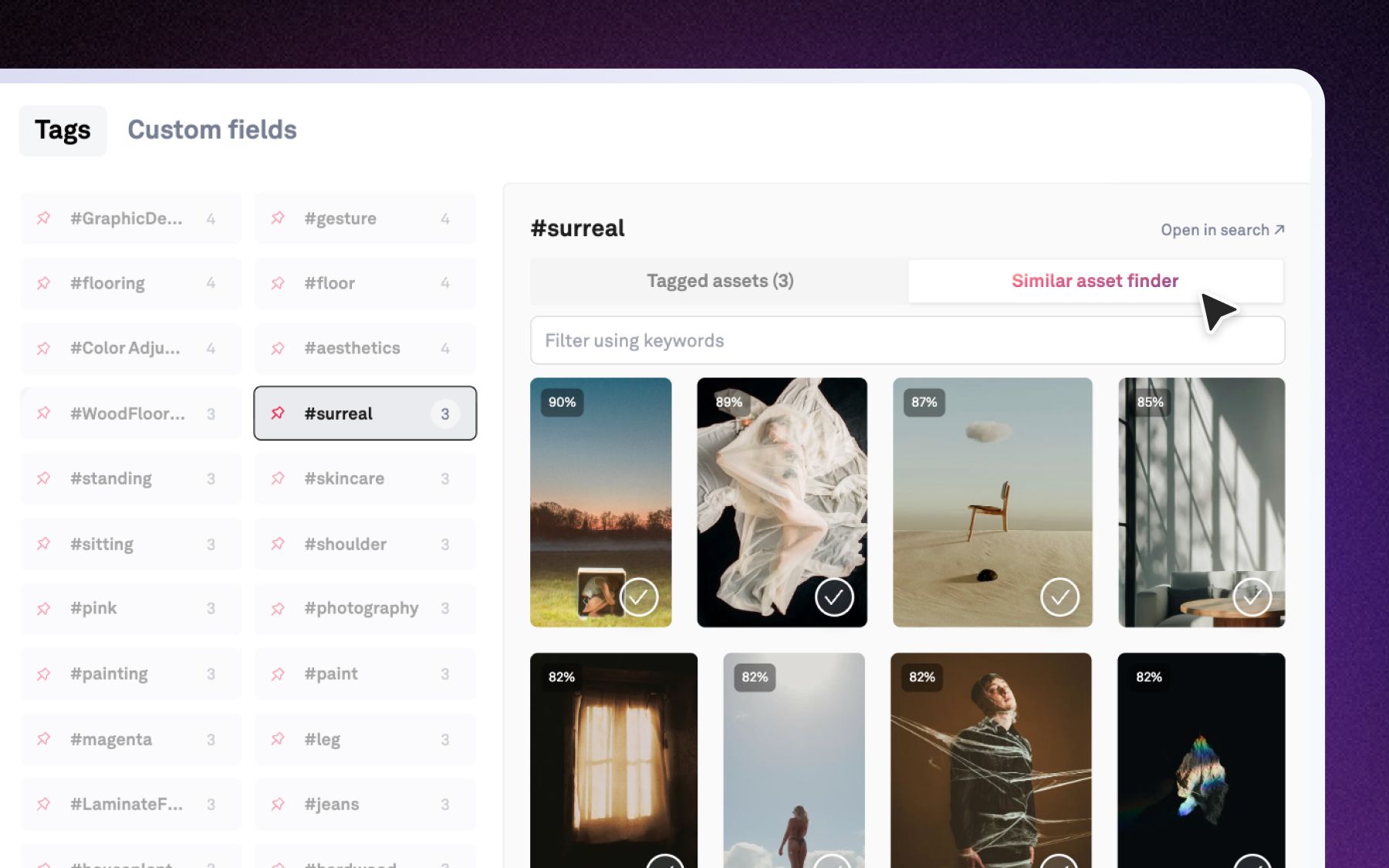
Chatting with your images also works in reverse. Instead of typing a description, drop in a reference image and Playbook finds its visual relatives across your whole library, the other frames from that session, the compositions that share its vibe. This is the GPT-powered smart search layer, and it means one good example is enough to recover the whole family of shots, with no tagging discipline required. Two capabilities, one embedding stack: describe an image to find it, or feed an image to find more like it.
What happens after Playbook finds the work?
Finding is rarely the goal. The follow-up is always "now share these," or "tag these," or "send these to the client," and Playbook handles that in the same thread. Describe what needs to happen in one prompt and Playbook breaks it into a step-by-step plan, runs each task in sequence, and checks in before anything major. Say "find all sunset beach shots and prep a share link for the client" and the search and the action happen in one motion.
This is the difference between a search bar and an assistant. A search bar hands you a list and stops. Playbook Intelligence keeps going, with an Actions tab that runs batch operations across every result and controls like "Edit plan" and "Stop workflow" so you stay in charge. For teams, that collapses a chain of tool-switching, export, re-upload, into a single conversation. As part of the Playbook Intelligence umbrella, these chained actions are in private beta at the time of writing. You can read more in the Playbook Intelligence launch announcement.
Who keeps a creative library organized?
Increasingly, the AI does the first pass, and a human approves it. Structuring a library by hand is the single most-avoided chore in asset management, so it never gets done and search quality suffers for everyone. AI Organize inverts the effort. It looks at a pile of loose assets, reads their content and tags rather than just filenames, and proposes a nested board structure grouped by subject, campaign, and content type. You review, refine by describing changes ("group by campaign, not file type"), and accept to build it.
The organizing signal comes from tagging that happens the moment an asset lands. The moment a creative file lands in Playbook, AI tags every image and video across 16+ dimensions, visual style, color palette, campaign, product, talent, and usage rights among them. Never file manually again is the promise, and it holds because the system understands every image and video by subject, mood, and brand elements before you ever open a board. Note that org-wide automated rules are on the roadmap and not shipped yet; what ships today is the proposal-and-accept flow and per-board upload rules.
What does talking to your files look like for real teams?
It looks like speed for teams whose whole business runs on turnaround. Dorst & Lesser, a 75-plus-person Amsterdam social agency, produces roughly 400 assets a week across 40-plus clients and 30-plus influencer relationships, and holds more than 59,000 assets in Playbook after migrating off Picter. For a shop moving at that pace, retrieval is the bottleneck. "Speed is very important because we are in the social business," says co-founder and creative director Robert Withagen. This is the daily reality for social and creative agencies juggling many clients at once.
It also looks like an escape from folder archaeology for video-heavy shops. Invictus Media, a Des Moines production house of seven where 90% of the work is video, switched from Dropbox after a 30-day test and now runs more than 33,000 assets in Playbook, inviting clients straight into boards for handoffs. "Playbook makes our videos look awesome," says CEO Jennifer Kathryn King. For video and production teams sitting on terabytes of footage, being able to describe a shot and find it changes the math on every project.
How do you get access, and what does it cost?
Playbook publishes every tier and price, so there is no "contact sales" wall to see a number. At the time of writing, the plans run Free at $0 (100GB, up to 300 assets), Pro at $120 per year (2TB), Team at $240 per year per member (3TB), and Business at $4,800 per year flat (15TB, unlimited members, SSO, and API access). Full detail lives on the pricing page, and pricing can change, so verify there.
Two facts matter most for this topic. First, the full conversational Playbook Intelligence experience, Plippy, chained actions, and AI Organize, is included starting on the Team plan, because AI processing of every image and video in a library carries real compute cost that Playbook absorbs into the seat price rather than metering. Basic natural-language search is available more broadly, with capacity that rises by tier. Second, guests are unlimited on every paid plan, so the whole review-and-approval chain can comment and download without a paid seat. Playbook Intelligence remains in private beta at the time of writing.
Frequently asked questions
What does "talk to your files" mean?
Talking to your files means finding and acting on creative assets through natural conversation instead of folder paths and filenames. You describe an asset the way you remember it, and the system returns matches based on visual content, then lets you tag, move, or share directly from the results.
What is conversational AI search?
Conversational AI search is a search experience that understands plain-language queries, reads image and video content rather than just metadata, and supports follow-up commands. In Playbook it combines semantic search with full-text matching, then adds an assistant, Plippy, that acts on the results within the same thread.
Can you search images by describing them?
Yes. Natural language image search matches your description against what images actually look like, using visual embeddings rather than filenames. You can also work in reverse by dropping in a reference image to find visually similar assets across your library. Both run on the same disclosed OpenCLIP and GPT stack.
Is Playbook Intelligence available now?
Playbook Intelligence launched in Q2 2026 and is, at the time of writing, in private beta for Playbook teams. It is marketed as powered by advanced AI. The conversational assistant is named Plippy, and it covers search, chained actions, and AI Organize.
Which plan includes conversational AI search?
The full Playbook Intelligence experience is included starting on the Team plan, which is $240 per year per member at the time of writing. Basic natural-language search is available more broadly, with query capacity that increases by tier. Verify current details on the pricing page.
Can AI organize a messy library for you?
Yes, with a human in the loop. AI Organize reads your assets' content and tags, proposes a nested board structure, and builds it once you accept. It relies on auto-tagging that runs on upload across 16-plus dimensions, so grouping reflects what is actually in your files.
See it on your own work
Your creative library should answer when you speak to it. Schedule a demo and watch Playbook find, organize, and act on your assets in a single conversation.